
When posting a Purchase Invoice, Spindle Purchase Invoice Recognition will check it against the line items on the corresponding Purchase Order(s) in Sage 200.
If the line items on the Purchase Invoice do not match the Purchase Order, the Purchase Invoice will go into a Discrepancy status in the Document Portal.
Note: You can see more information about the discrepancy by hovering over the Discrepancy status.
In the Document Portal, you can select the document and click the 'Post' button to accept the discrepancy and post the Purchase Invoice into Sage 200.
Override Discrepancy status and Post Purchase Invoice
You have the option to disable the Discrepancy check.
Note: This will require you to make a configuration change on your server.
1. On the server, open the Spindle Document Management Server Administration tools
2. Click on Recognition...
3. Click on System Configuration...
4. Click on the Advanced Settings tab
5. Go to the ‘Skip all Discrepancies’ option
6. Click Yes
7. Click OK
8. You will be prompted to restart the Spindle Purchase Invoice Recognition services. Note: The Spindle Document Recognition Post Agent must be restarted for the changes to take effect.
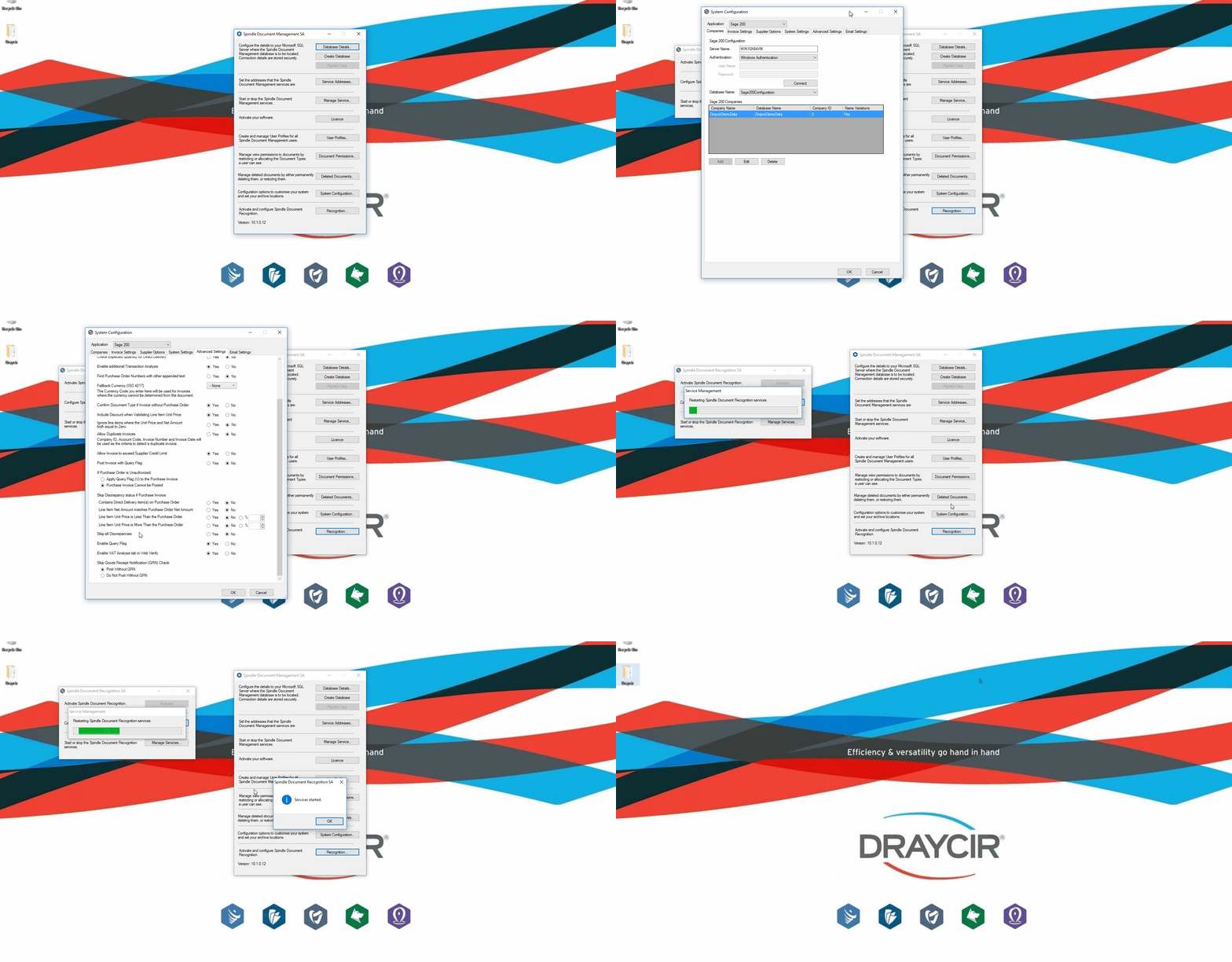 Server Administration - Skip all Discrepancies
This option resides in the Spindle Document Management Server Administration tools on your application server.
Note: To benefit from this feature you must be on Spindle Document Management version 10.1 or later.