
If you are using Spindle Purchase Invoice Recognition for more than one Company (dataset), you are able to isolate Purchase Invoice data between the two companies by configuring document permissions by Company.
You can explicitly set document permissions for each user based on the companies that you would like them to have access to.
How to setup document permissions by Company
- On the server, open the Spindle Document Management Server Administration tools
- Click on the Companies...
- Select the checkbox Restrict Document Permissions by Company...
- If you have documents already archived in Spindle Purchase Invoice Recognition, then the companies will already be listed here. If you want to allocate users to a company that is already listed, select the company and click Edit Company... and go to step 5.
- Click Add Company...
- In the Company Information section enter the following information:
- Company Code: This is the Company ID/Dataset ID held in your accounting system
- Company Name: Company name held in your accounting system
- In the User Permissions section, you will see all available users listed on the left-hand side
- Select the user(s) that you would like to have access to the company
- Click on the > arrow
- Click OK
- Click OK in the Companies screen
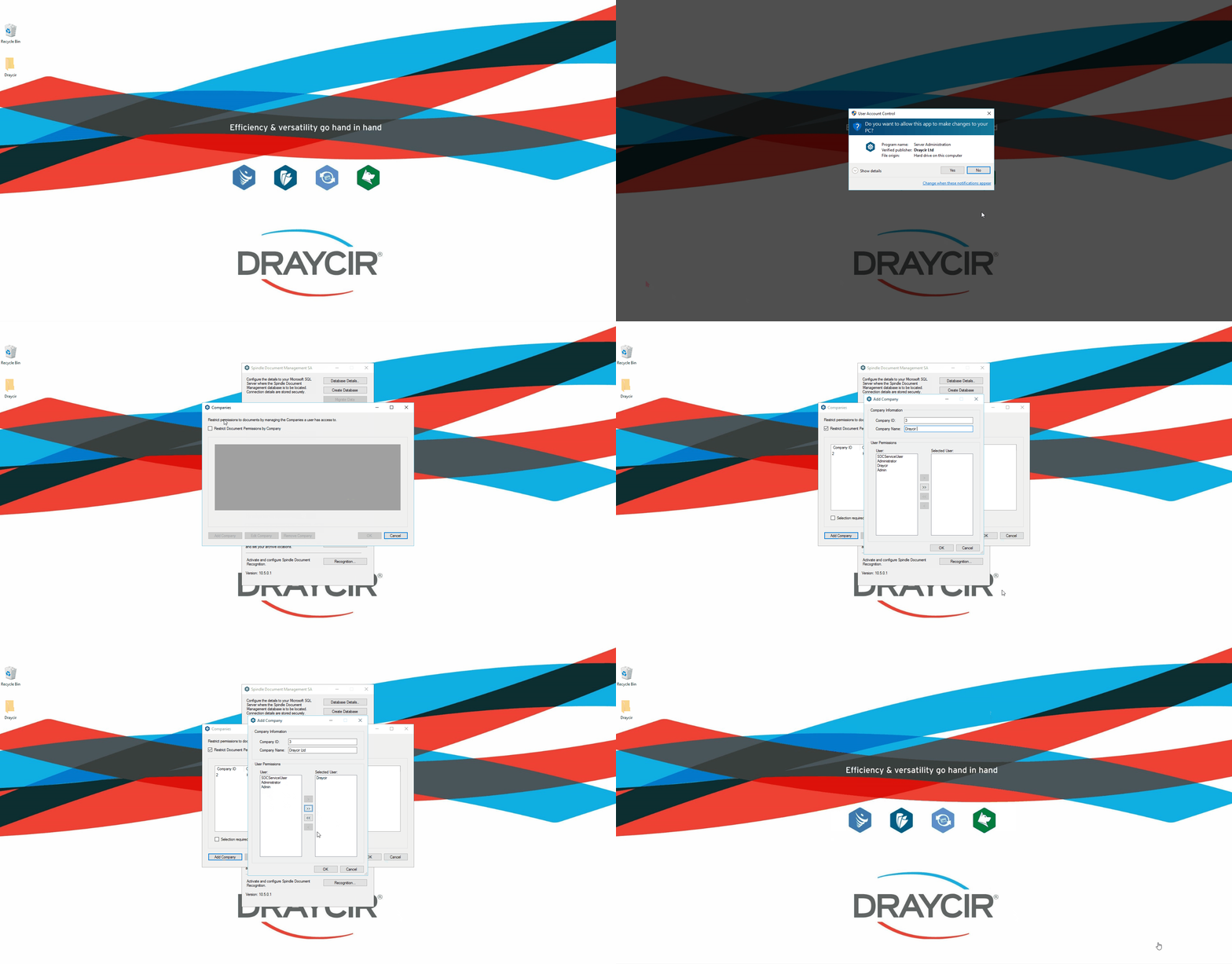 How to setup document permissions by Company
Why am I not able to remove a Company?
You are only able to remove a Company if no documents have been archived against this Company.
Why can I not see the Companies option from the Spindle Document Management Server Administration tools?
To benefit from this feature you must be on Spindle Document Management version 10.5 or later.